-
0:01
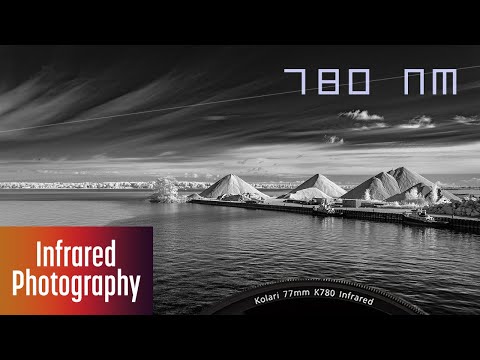
The 780 nanometer filter sits near the boundary between visible and infrared light.
-
0:09
Will it capture only infrared light? Will it capture the broadest range of near-infrared wavelengths?
-
0:16
How does it compare to the 720 or 830 nanometer filters?
-
0:23
The 780 nanometer high-pass filter tested my assumptions about the boundary between visible and infrared light. I've spent the last couple of years shooting with this relatively new filter to see what kind of results it would produce.
-
0:40
All of these images were shot with the Kolari K780 Pro Slim G3, a 780 nanometer infrared filter. I purchased this filter and this video is not sponsored. These were shot on a Fujifilm X70 converted to full spectrum. 780 falls between the popular 720 and 830 nanometer filters. I was curious what type of images it would produce, since 780 is
-
1:11
just above 750 nanometers, the approximate transition between visible and infrared light. I hypothesized that it would capture a broader range of near-infrared light than an 830 nanometer filter while blocking all visible light. In fact, while it does capture a broader range of wavelengths, it
-
1:36
also captured the faintest visible light. When white balanced, this results in a light gold sky. After a color swap, you'll have a lightly saturated blue sky.
-
1:51
When used with an unconverted camera, you can expect long exposures of around 1 to 3 seconds at ISO 200 and f5.6. You'll either need a tripod or a combination of in-body image stabilization and a higher ISO. With a converted camera using the same ISO and f-stop, exposures are around one hundredth of a second, allowing you to handhold your
-
2:17
camera with normal and wide angle lenses.
-
2:22
When editing color images, I found that the sky saturation was so low that it often caused subtle color banding, especially with a lens that exhibits mild hotspots. For this reason, I favored this filter for producing monochrome images. If you'd like a blue sky, use a lens that is absolutely free of hotspots.
-
2:49
The 780 nanometer filter is great for monochrome. In particular, I like high contrast monochrome images. This filter produced bright foliage. Check out how this underwater plant life pops in infrared.
-
3:06
With a little bit of editing, you can also get dark skies, high contrast clouds, and dark water.
-
3:16
It's also an excellent choice for architecture.
-
3:23
When comparing the 780 to a 720 nanometer high pass filter, the 720 will capture more visible light, which can be used to create a blue sky after a color swap. If you want to capture blue skies with white or lightly saturated foliage, then I would recommend a 720 filter over the 780.
-
3:49
When comparing the 780 to an 830 or 850 nanometer high pass filter, the 800 range filters will produce darker skies and darker water. If you want to capture only infrared light, then use an 830 or 850 nanometer high pass filter.
-
4:12
You can use any editor to edit monochrome infrared images. No custom profiles are required. Use any monochrome or black and white profile offered by your editor. You can also use editors such as Silver EFEX in the Nik Collection. I found the 780 nanometer filter an excellent option for capturing
-
4:35
monochrome infrared images and the occasional blue sky image. If you want to capture only infrared light, then use an 830 or 850 nanometer filter. If you want more color, try a 720 nanometer or lower high pass filter. If you're looking to capture the broadest range of near infrared
-
4:57
wavelengths and don't mind a hint of visible light, then check out the 780 nanometer filter.
-
5:06
Have you used a 780 nanometer filter? Let us know in the comments. If you'd like to learn more about infrared photography, check out my new courses, Mastering Infrared Photography in Lightroom and Lightroom Classic. A link is in the description.
-
5:23
If you find these videos helpful on your infrared photography journey, like, subscribe, or comment. Hope you enjoyed. Thanks.